

Supported payment methods
Integration shows how the buyer pays:- Direct: you send card or bank account details through Gr4vy, using Embed, Secure Fields, or the API. Gr4vy stores bank accounts. See Bank payments.
- Redirect: the buyer completes the payment on the provider’s page, and the provider keeps their details.
- Redirect or SDK: as redirect, or you can use the provider’s own SDK or components in place of the redirect. See the method’s page.
Setup
Adyen provides a self-service sign-up for a sandbox account. To sign up for an account visit the sign-up page and fill in the details.Credentials
To set up credentials for Adyen, head to their dashboard and navigate to Developers -> API credentials in the left hand sidebar. Next, create a set of credentials. You need to create a Web Service key and give it a name. Setting the name to something that describes the use for the key is recommended, for exampleOrchestration API.
For most Adyen connectors you need to then copy some of the following details
into the dashboard.
- A server-side API key - This key can be found on the credentials page under Server Settings -> Authentication -> API key. This is the key used to communicate with the Adyen API from the server.
- A client-side key - This key can be found on the credentials page under Client Settings -> Authentication -> Client key. This is the key used to communicate with the Adyen API from frontend integrations. This key is mostly needed for local and alternative payment methods.
- A merchant account - This is the public ID of your account. This value is needed for most API calls. You can find this in your dashboard under Settings -> Account settings -> Merchant overview -> Name.
Live endpoint prefix
Every live Adyen connection needs the Live endpoint prefix. Adyen gives each company account its own hostname for live API requests, and Gr4vy builds that hostname from the prefix. Sandbox connections use Adyen’s shared test endpoint and ignore this field. To find the prefix, go to Developers -> API URLs -> Prefix in your live Adyen Customer Area. For example, if your live URL ishttps://1797a841fbb37ca7-AdyenDemo-checkout-live.adyenpayments.com/checkout/v53/payments
then the live URL prefix is 1797a841fbb37ca7-AdyenDemo.
See
Live URL prefix
for more details.
Allowed origins (conditional)
For alternative payment methods it’s essential to also enable the allowed origin for your instance. This allows connections to the Adyen API from hosted components, like Embed. For a given API credential, scroll down to the Client settings section where you find the allowed origins configuration. Add one of the following domains based on your environment.https://cdn.{instance_id}.gr4vy.apphttps://cdn.sandbox.{instance_id}.gr4vy.app
{instance_id} is the name of your instance.
Without the allowed origin, Adyen’s components can’t load in the payment page,
and a redirect payment doesn’t get past its loading screen.
Web components environment (conditional)
It is required to set the environment to load the web components from for live Adyen transactions. This mainly applies to alternative payment methods and not card payments. The environment should be set to one of the following, depending on your region. If no value is provided, a default value oflive is used.
Webhook format
In the Adyen panel, “Webhook configuration” section, “Method” should be set to JSON.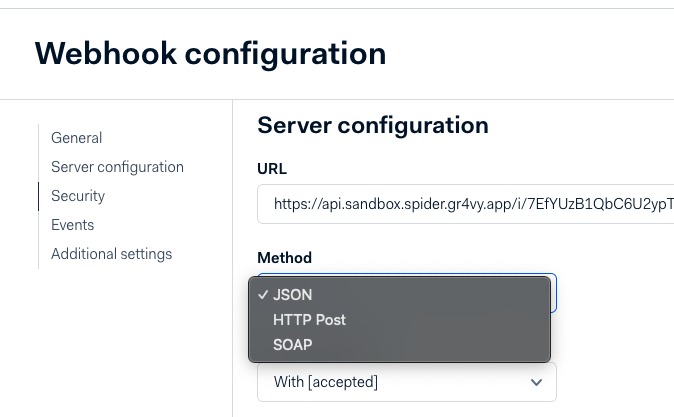
Adyen webhook format
Billing address
Gr4vy sends Adyen’sstateOrProvince from the address state_code, which is
in ISO 3166-2 format, for example US-UT. The free-text state isn’t sent.
Adyen requires
a state or province for US and Canadian addresses, so include state_code for
these buyers. When Adyen rejects a payment because a required billing address
field is missing, the transaction fails with the missing_billing_address
error code.
Identifier limitations
When an approval is required on a transaction, thepayment_service_transaction_id changes between the transaction creation and the approval.
This is because until the user approves, Adyen generates an offer, and the payment is generated only after the approval. See Offers and Payments for more details.