> ## Documentation Index
> Fetch the complete documentation index at: https://docs.gr4vy.com/llms.txt
> Use this file to discover all available pages before exploring further.
# Anti-fraud
> Use decisions and scores from anti-fraud services in Flow rules to manage risk in your transaction flow.
As part of [Flow](/guides/dashboard/flow) the system allows you to build rules
which use decisions and scores from anti-fraud services.
For detailed information on setting up and configuring specific anti-fraud providers, see the anti-fraud services in the [connection catalog](/connections/catalog?category=anti-fraud). Cybersource, Forter, Riskified, Sardine, and Sift are supported.
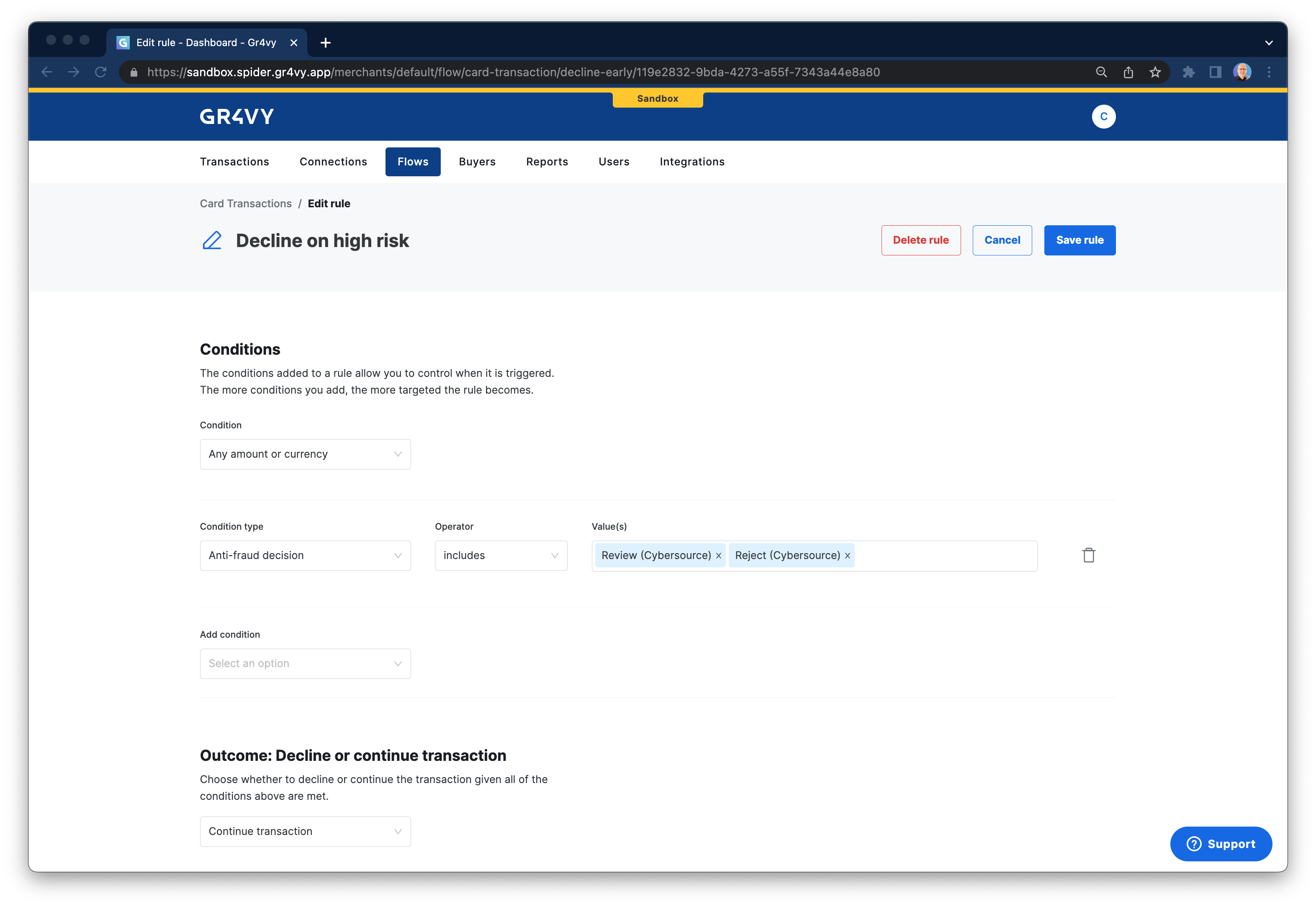 You can use these scores and decisions for [card transactions](/guides/dashboard/flow/card-transactions)
to evaluate the risk of a transaction and take
appropriate actions to, for example, force 3-D Secure, decline a transaction, or route to
a specific payment service.
## How does it work?
For every transaction, your [**Primary**](#connection-mode) anti-fraud service is only called **once**.
When a request is made for a transaction, your active anti-fraud provider is only called
once, assuming a rule is triggered for which an anti-fraud score or decision is the condition.
This feature prevents incurring any extra cost by calling your anti-fraud service multiple times,
or calling your service unnecessarily if the rule is not triggered.
## Connection mode
Each of your configured anti fraud services can be set to a **Primary**, [**Silent**](/guides/features/anti-fraud/silent-mode), or **Inactive** mode.
| Mode | Description |
| :- | :- |
| **Primary** | Traffic is processed through this connector's fraud checks. It returns an approval or decline, which determines whether the transaction continues. Only one primary connector can be configured at any time. |
| [**Silent**](./silent-mode) | Traffic is processed through this connector, but its decision is not enforced. Results are logged for learning/analysis only. |
| **Inactive** | No traffic is processed through this connector, but it is available to be re-activated at any time. |
## Anti-fraud decisions
Gr4vy maps each provider's response to one of the following decisions. The transaction's `anti_fraud_decision`
field holds the decision from the Primary service, and the **Anti-fraud decision** condition in Flow matches on the
same values.
| Decision | Flow label | Description |
| :- | :- | :- |
| `accept` | Accept | The service accepted the transaction. |
| `reject` | Reject | The service rejected the transaction. |
| `review` | Review | The service flagged the transaction for a [manual review](/guides/features/anti-fraud/reviews). |
| `error` | Error | The service returned an error decision, or a decision that Gr4vy can't map to another value. |
| `exception` | Error (network error) | The call to the service failed, for example because it timed out or returned a server error. |
| `skipped` | Skipped (unable to get decision) | Gr4vy couldn't get a decision, for example because the service rejected the request. |
| `pending` | Not applicable | The check hasn't completed yet. |
`anti_fraud_decision` is `null` when no anti-fraud check ran for the transaction. For a `review` decision, the field
keeps the value `review` after the review is resolved.
This documentation is built and hosted on [Mintlify](https://mintlify.com), a developer documentation platform.
You can use these scores and decisions for [card transactions](/guides/dashboard/flow/card-transactions)
to evaluate the risk of a transaction and take
appropriate actions to, for example, force 3-D Secure, decline a transaction, or route to
a specific payment service.
## How does it work?
For every transaction, your [**Primary**](#connection-mode) anti-fraud service is only called **once**.
When a request is made for a transaction, your active anti-fraud provider is only called
once, assuming a rule is triggered for which an anti-fraud score or decision is the condition.
This feature prevents incurring any extra cost by calling your anti-fraud service multiple times,
or calling your service unnecessarily if the rule is not triggered.
## Connection mode
Each of your configured anti fraud services can be set to a **Primary**, [**Silent**](/guides/features/anti-fraud/silent-mode), or **Inactive** mode.
| Mode | Description |
| :- | :- |
| **Primary** | Traffic is processed through this connector's fraud checks. It returns an approval or decline, which determines whether the transaction continues. Only one primary connector can be configured at any time. |
| [**Silent**](./silent-mode) | Traffic is processed through this connector, but its decision is not enforced. Results are logged for learning/analysis only. |
| **Inactive** | No traffic is processed through this connector, but it is available to be re-activated at any time. |
## Anti-fraud decisions
Gr4vy maps each provider's response to one of the following decisions. The transaction's `anti_fraud_decision`
field holds the decision from the Primary service, and the **Anti-fraud decision** condition in Flow matches on the
same values.
| Decision | Flow label | Description |
| :- | :- | :- |
| `accept` | Accept | The service accepted the transaction. |
| `reject` | Reject | The service rejected the transaction. |
| `review` | Review | The service flagged the transaction for a [manual review](/guides/features/anti-fraud/reviews). |
| `error` | Error | The service returned an error decision, or a decision that Gr4vy can't map to another value. |
| `exception` | Error (network error) | The call to the service failed, for example because it timed out or returned a server error. |
| `skipped` | Skipped (unable to get decision) | Gr4vy couldn't get a decision, for example because the service rejected the request. |
| `pending` | Not applicable | The check hasn't completed yet. |
`anti_fraud_decision` is `null` when no anti-fraud check ran for the transaction. For a `review` decision, the field
keeps the value `review` after the review is resolved.
This documentation is built and hosted on [Mintlify](https://mintlify.com), a developer documentation platform.