> ## Documentation Index
> Fetch the complete documentation index at: https://docs.gr4vy.com/llms.txt
> Use this file to discover all available pages before exploring further.

# NMI - Card

> Connect to NMI to accept card payments.

export const connector = {
  id: "nmi-card",
  displayName: "NMI",
  provider: "",
  method: "card",
  mode: "card",
  category: "card",
  features: "create_transaction delayed_capture delete_token digital_wallets partial_capture partial_refunds payment_method_tokenization refunds requires_webhook_setup three_d_secure_pass_through verify_credentials void zero_auth",
  supportedCountries: "AE AR AT BE BO BR CA CH CL CN CO CY DE DK EE ES FI FR GB GR HK ID IL IN IT JP KR LT LU LV MT MX MY NL NO NZ PE PH PL PT PY RU SE SG SI SK TH TR TW US ZA",
  supportedCurrencies: "AED ARS AUD BOB BRL CAD CHF CLP CNY COP DKK EUR GBP HKD IDR ILS INR JPY KRW MXN MYR NOK NZD PEN PHP PLN PYG RUB SEK SGD THB TRY TWD USD ZAR"
};

export const ConnectorRegions = ({data, kind, name: nameOverride}) => {
  const [query, setQuery] = useState("");
  const [open, setOpen] = useState(false);
  const isCountries = kind === "countries";
  const raw = data && (isCountries ? data.supportedCountries : data.supportedCurrencies);
  const codes = typeof raw === "string" ? raw.split(/\s+/).filter(Boolean) : Array.isArray(raw) ? raw : [];
  const DISPLAY_NAME_OVERRIDES = {
    authorizenet: "Authorize.net",
    cardpointe: "CardPointe",
    cybersource: "Cybersource",
    dlocal: "dLocal",
    shift4i4go: "Shift4 i4go",
    tokenex: "TokenEx"
  };
  const rawName = data && data.displayName || "";
  const name = nameOverride || DISPLAY_NAME_OVERRIDES[rawName.toLowerCase()] || rawName || "This connector";
  const verb = isCountries ? "supports transactions from buyers in" : "supports processing payments in";
  const noun = isCountries ? "countries" : "currencies";
  if (codes.length === 0) return null;
  const unrestricted = codes.length >= (isCountries ? 200 : 150);
  const disclaimer = <p style={{
    opacity: 0.7,
    fontSize: "0.8125rem",
    marginTop: "0.75rem"
  }}>
      This list is for guidance only. It doesn't guarantee availability or
      create any rights, and the provider must also enable each of these {noun}{" "}
      for your account.
    </p>;
  let displayNames = null;
  try {
    displayNames = new Intl.DisplayNames(["en"], {
      type: isCountries ? "region" : "currency"
    });
  } catch (e) {
    displayNames = null;
  }
  const resolve = code => {
    if (!displayNames) return null;
    try {
      const resolved = displayNames.of(code);
      return resolved && resolved !== code ? resolved : null;
    } catch (e) {
      return null;
    }
  };
  const MAJOR_CURRENCIES = ["USD", "EUR", "GBP", "CAD", "AUD", "JPY", "CHF", "CNY", "SGD", "HKD", "NZD", "SEK", "NOK", "DKK", "MXN", "BRL", "INR"];
  const items = codes.map(code => ({
    code,
    label: resolve(code)
  }));
  if (isCountries) {
    items.sort((a, b) => (a.label || a.code).localeCompare(b.label || b.code));
  } else {
    const rank = code => {
      const i = MAJOR_CURRENCIES.indexOf(code);
      return i === -1 ? MAJOR_CURRENCIES.length : i;
    };
    items.sort((a, b) => rank(a.code) - rank(b.code) || a.code.localeCompare(b.code));
  }
  if (codes.length <= 3) {
    const parts = items.map(it => isCountries || !it.label ? it.label || it.code : `${it.label} (${it.code})`);
    const joined = parts.length === 1 ? parts[0] : parts.length === 2 ? `${parts[0]} and ${parts[1]}` : `${parts.slice(0, -1).join(", ")}, and ${parts[parts.length - 1]}`;
    return <div>
        <p>
          {name} {verb} {joined}.
        </p>
        {disclaimer}
      </div>;
  }
  const chipStyle = {
    display: "inline-flex",
    alignItems: "baseline",
    gap: "0.4rem",
    padding: "0.15rem 0.55rem",
    borderRadius: "0.375rem",
    border: "1px solid rgba(128, 128, 128, 0.25)",
    fontSize: "0.875rem",
    lineHeight: 1.5
  };
  const codeStyle = {
    fontFamily: "var(--font-mono, ui-monospace, monospace)",
    fontWeight: 600,
    fontSize: "0.8125rem"
  };
  const controlStyle = {
    color: "inherit",
    background: "transparent",
    border: "1px solid rgba(128, 128, 128, 0.3)",
    borderRadius: "0.5rem",
    fontSize: "0.875rem"
  };
  const renderChip = it => <span key={it.code} style={chipStyle} title={isCountries ? it.code : it.label || it.code}>
      {isCountries ? it.label || it.code : <span style={codeStyle}>{it.code}</span>}
      {!isCountries && it.label ? <span style={{
    opacity: 0.7
  }}>{it.label}</span> : null}
    </span>;
  const PREVIEW = 5;
  const collapsible = items.length > PREVIEW;
  const q = query.trim().toLowerCase();
  const filtered = q ? items.filter(it => it.code.toLowerCase().includes(q) || it.label && it.label.toLowerCase().includes(q)) : items;
  const expanded = open || q !== "";
  const visible = !collapsible ? items : expanded ? filtered : items.slice(0, PREVIEW);
  const toggle = () => {
    const next = !open;
    setOpen(next);
    if (!next) setQuery("");
  };
  return <div>
      {unrestricted ? <p>
          Gr4vy doesn't limit {name} to specific {noun}. Check with the provider
          which {noun} it supports for your account.
        </p> : <p>
          {name} {verb} the following {codes.length} {noun}:
        </p>}

      {collapsible ? <input type="text" value={query} onChange={e => setQuery(e.target.value)} placeholder={`Filter ${noun}…`} aria-label={`Filter ${noun}`} style={{
    ...controlStyle,
    display: "block",
    width: "100%",
    maxWidth: "22rem",
    padding: "0.4rem 0.7rem",
    margin: "0 0 0.75rem"
  }} /> : null}

      <div style={{
    display: "flex",
    flexWrap: "wrap",
    gap: "0.4rem"
  }}>
        {visible.map(renderChip)}
      </div>

      {q && filtered.length === 0 ? <p style={{
    opacity: 0.7,
    marginTop: "0.6rem"
  }}>
          No {noun} match “{query.trim()}”.
        </p> : null}
      {q && filtered.length > 0 ? <p style={{
    opacity: 0.6,
    fontSize: "0.8125rem",
    marginTop: "0.6rem"
  }}>
          Showing {filtered.length} of {items.length}.
        </p> : null}

      {collapsible && !q ? <button type="button" aria-expanded={open} onClick={toggle} style={{
    ...controlStyle,
    display: "inline-flex",
    alignItems: "center",
    gap: "0.4rem",
    padding: "0.35rem 0.75rem",
    marginTop: "0.75rem",
    cursor: "pointer"
  }}>
          <span aria-hidden="true" style={{
    display: "inline-block",
    transform: open ? "rotate(90deg)" : "none",
    transition: "transform 0.15s ease"
  }}>
            ›
          </span>
          {open ? "Show fewer" : `and ${items.length - PREVIEW} more`}
        </button> : null}

      {disclaimer}
    </div>;
};

export const ConnectorCapabilities = ({data}) => {
  const CAPABILITIES = [{
    keys: ["three_d_secure_pass_through"],
    label: "3-D Secure",
    description: "Gr4vy runs the 3DS authentication and sends the results to the provider on the authorization.",
    cardOnly: true
  }, {
    keys: ["three_d_secure_hosted"],
    label: "3-D Secure (provider-hosted)",
    description: "The provider runs the 3DS authentication itself, redirecting the buyer to its own page.",
    cardOnly: true
  }, {
    keys: ["partial_authorization"],
    label: "Partial authorization",
    description: "Support partial approval responses."
  }, {
    keys: ["zero_auth"],
    label: "Zero auth",
    description: "Verify a payment method without charging it."
  }, {
    keys: ["void"],
    label: "Void",
    description: "Cancel an authorized transaction before capture."
  }, {
    keys: ["incremental_authorization"],
    label: "Incremental authorization",
    description: "Increase the amount of an existing authorization before capture."
  }, {
    keys: ["direct_capture"],
    label: "Direct capture",
    description: "Capture a payment immediately at authorization.",
    hideWhenUnsupported: true
  }, {
    keys: ["delayed_capture"],
    label: "Delayed capture",
    description: "Authorize a payment and capture it at a later time."
  }, {
    keys: ["partial_capture"],
    label: "Partial capture",
    description: "Capture a portion of the authorized amount."
  }, {
    keys: ["over_capture"],
    label: "Over capture",
    description: "Capture more than the originally authorized amount."
  }, {
    keys: ["multi_capture"],
    label: "Multiple captures",
    description: "Capture one authorization in several partial captures."
  }, {
    keys: ["tracking_details"],
    label: "Shipment tracking",
    description: "Forward shipment tracking details to the provider on capture."
  }, {
    keys: ["refunds"],
    label: "Refunds",
    description: "Refund a captured payment."
  }, {
    keys: ["partial_refunds"],
    label: "Partial refunds",
    description: "Refund a portion of the captured amount."
  }, {
    keys: ["settlement_reporting"],
    label: "Settlement reporting",
    description: "Automatic settlement and reconciliation reporting."
  }, {
    keys: ["create_session"],
    label: "Create session",
    description: "Create a connector session for client-side flows."
  }, {
    keys: ["network_tokens_default", "network_tokens_toggle"],
    label: "Network tokens",
    description: "Network-level tokenization for improved approval rates.",
    cardOnly: true
  }, {
    keys: ["open_loop", "open_loop_toggle"],
    label: "Open loop",
    description: "Charge stored cards with card data from the Gr4vy vault, so merchant-initiated payments aren't tied to the connection that stored the card.",
    optionalKey: "open_loop_toggle",
    optionalNote: "Off by default. The provider must allow it before you turn it on for the connection.",
    cardOnly: true
  }, {
    keys: ["issuer_based_installments"],
    label: "Issuer installments",
    description: "Ask the issuer to split a single payment into installments with installment_count.",
    cardOnly: true,
    hideWhenUnsupported: true
  }, {
    keys: ["digital_wallets"],
    label: "Digital wallets",
    description: "Apple Pay, Google Pay, and other wallet integrations."
  }, {
    keys: ["payment_method_tokenization", "payment_method_tokenization_toggle"],
    label: "Payment method tokenization",
    description: "Store payment methods outside of transactions."
  }, {
    keys: ["transaction_sync"],
    label: "Transaction sync",
    description: "Synchronize transaction state from the connector."
  }, {
    keys: ["create_token"],
    label: "Tokenization",
    description: "Create a token from card details collected via Secure Fields.",
    hideWhenUnsupported: true
  }, {
    keys: ["delete_token"],
    label: "Delete token",
    description: "Delete a stored token.",
    hideWhenUnsupported: true
  }, {
    keys: ["verify_credentials"],
    label: "Verify credentials",
    description: "Validate the configured credentials against the connector.",
    hideWhenUnsupported: true
  }];
  const raw = data && data.features;
  const enabled = typeof raw === "string" ? new Set(raw.split(/\s+/).filter(Boolean)) : Array.isArray(raw) ? new Set(raw) : new Set(Object.keys(raw || ({})).filter(key => raw[key]));
  const isOn = entry => entry.keys.some(key => enabled.has(key));
  const isNonCard = data && data.method && data.method !== "card";
  const renderGroup = (title, entries, supported) => {
    if (entries.length === 0) return null;
    const mark = supported ? "✓" : "✕";
    const markColor = supported ? "#16a34a" : "#9ca3af";
    return <div style={{
      marginTop: "1rem"
    }}>
        <div style={{
      fontSize: "0.75rem",
      fontWeight: 600,
      letterSpacing: "0.05em",
      textTransform: "uppercase",
      opacity: 0.6,
      marginBottom: "0.25rem"
    }}>
          {title}
        </div>
        {}
        <div role="list">
          {entries.map(entry => <div role="listitem" key={entry.label} style={{
      display: "flex",
      gap: "0.5rem",
      alignItems: "baseline",
      padding: "0.3rem 0",
      opacity: supported ? 1 : 0.7
    }}>
              <span aria-hidden="true" style={{
      color: markColor,
      fontWeight: 700,
      flexShrink: 0
    }}>
                {mark}
              </span>
              <span>
                <strong>{entry.label}</strong>
                {entry.description ? <span style={{
      opacity: 0.85
    }}> — {entry.description}</span> : null}
                {supported && entry.optionalKey && entry.keys.every(key => key === entry.optionalKey || !enabled.has(key)) ? <span style={{
      opacity: 0.85
    }}> {entry.optionalNote}</span> : null}
              </span>
            </div>)}
        </div>
      </div>;
  };
  const visible = isNonCard ? CAPABILITIES.filter(entry => !entry.cardOnly) : CAPABILITIES;
  const supported = visible.filter(isOn);
  const unsupported = visible.filter(entry => !isOn(entry) && !entry.hideWhenUnsupported);
  return <div>
      {renderGroup("Supported", supported, true)}
      {renderGroup("Not supported", unsupported, false)}
      <p style={{
    opacity: 0.7,
    fontSize: "0.8125rem"
  }}>
        This list is for guidance only. It doesn't guarantee availability or
        create any rights, and the provider may need to enable some features for
        your account.
      </p>
    </div>;
};

export const ConnectorHeader = ({data, name: nameProp, method: methodName, logo, category: categoryProp, catalog, providers}) => {
  const [logoStage, setLogoStage] = useState(0);
  const [chipLogoFailed, setChipLogoFailed] = useState(false);
  const [anchors, setAnchors] = useState({});
  useEffect(() => {
    const found = {};
    for (const id of ["capabilities", "supported-countries", "supported-currencies", "supported-payment-methods"]) {
      found[id] = Boolean(document.getElementById(id));
    }
    setAnchors(found);
  }, []);
  const hasData = Boolean(data && data.id);
  if (!hasData && !(nameProp && logo)) return null;
  const CATEGORY_LABELS = {
    card: "Cards",
    bank: "Banking",
    bnpl: "BNPL",
    cash: "Cash vouchers",
    crypto: "Crypto",
    wallet: "Wallets",
    tokenization: "Tokenization"
  };
  const DISPLAY_NAME_OVERRIDES = {
    authorizenet: "Authorize.net",
    cardpointe: "CardPointe",
    cybersource: "Cybersource",
    dlocal: "dLocal",
    shift4i4go: "Shift4 i4go",
    tokenex: "TokenEx",
    "worldine travelhub": "Worldline TravelHub"
  };
  const HIGHLIGHTS = [{
    keys: ["three_d_secure_pass_through", "three_d_secure_hosted"],
    label: "3-D Secure",
    cardOnly: true
  }, {
    keys: ["network_tokens_default", "network_tokens_toggle"],
    label: "Network tokens",
    cardOnly: true
  }, {
    keys: ["digital_wallets"],
    label: "Digital wallets"
  }, {
    keys: ["delayed_capture"],
    label: "Delayed capture"
  }, {
    keys: ["partial_capture"],
    label: "Partial capture"
  }, {
    keys: ["refunds"],
    label: "Refunds"
  }, {
    keys: ["partial_refunds"],
    label: "Partial refunds"
  }, {
    keys: ["zero_auth"],
    label: "Zero auth"
  }, {
    keys: ["settlement_reporting"],
    label: "Settlement reporting"
  }];
  const d = hasData ? data : {};
  const method = d.method || "";
  const provider = !hasData ? "" : method && d.id.endsWith(`-${method}`) ? d.id.slice(0, -(method.length + 1)) : d.id.split("-")[0];
  const fix = value => DISPLAY_NAME_OVERRIDES[(value || "").toLowerCase()] || value || "";
  const name = fix(d.provider) || nameProp || fix(d.displayName) || provider;
  const displayName = fix(d.displayName);
  const productName = !hasData ? "" : method === "card" ? d.provider ? displayName : "" : methodName || (d.provider && displayName !== name ? displayName : "");
  const methodLed = Boolean(productName);
  const cardProduct = methodLed && method === "card";
  const category = categoryProp || (method === "card" && !cardProduct ? "" : CATEGORY_LABELS[d.category] || "");
  const flowLabel = d.category !== "bank" ? "" : d.mode === "bank" ? "Stored in Gr4vy" : d.mode === "redirect" ? "Redirect" : "";
  const providerLogo = hasData ? `/assets/connectors/providers/${provider}.svg` : logo;
  const methodLogo = `/assets/connectors/methods/${method}.svg`;
  const title = methodLed ? productName : name;
  const chipLabel = !hasData ? "" : methodLed ? `via ${name}` : methodName;
  const chipLogo = cardProduct ? "" : methodLed ? providerLogo : methodLogo;
  const logos = methodLed && !cardProduct ? [methodLogo, providerLogo] : [providerLogo];
  const primaryLogo = logos[logoStage] || null;
  const enabled = new Set((d.features || "").split(/\s+/).filter(Boolean));
  const highlights = HIGHLIGHTS.filter(h => !(h.cardOnly && method !== "card") && h.keys.some(k => enabled.has(k)));
  const codes = value => (value || "").split(/\s+/).filter(Boolean);
  const providerSet = new Set(codes(providers));
  const members = !hasData && catalog && providerSet.size > 0 ? catalog.filter(e => providerSet.has(e.provider)) : [];
  const union = key => new Set(members.flatMap(e => codes(e[key]))).size;
  const methodsCount = members.length;
  const countries = hasData ? codes(d.supportedCountries).length : union("countries");
  const currencies = hasData ? codes(d.supportedCurrencies).length : union("currencies");
  const border = "1px solid rgba(128, 128, 128, 0.2)";
  const labelStyle = {
    fontSize: "0.6875rem",
    fontWeight: 600,
    letterSpacing: "0.05em",
    textTransform: "uppercase",
    opacity: 0.6
  };
  const chipStyle = {
    display: "inline-flex",
    alignItems: "center",
    gap: "0.3rem",
    padding: "0.1rem 0.5rem",
    borderRadius: "999px",
    border,
    fontSize: "0.8125rem",
    whiteSpace: "nowrap"
  };
  const renderStat = (label, value, anchor) => <a href={anchors[anchor] ? `#${anchor}` : undefined} style={{
    display: "flex",
    flexDirection: "column",
    gap: "0.1rem",
    textDecoration: "none",
    borderBottom: "none",
    color: "inherit",
    minWidth: "6rem"
  }}>
      <span style={labelStyle}>{label}</span>
      <span style={{
    fontSize: "1.25rem",
    fontWeight: 600
  }}>{value}</span>
    </a>;
  return <div className="not-prose" style={{
    border,
    borderRadius: "0.75rem",
    padding: "1.25rem",
    margin: "1rem 0 1.5rem",
    display: "flex",
    flexDirection: "column",
    gap: "1rem"
  }}>
      <div style={{
    display: "flex",
    alignItems: "center",
    gap: "1rem"
  }}>
        {primaryLogo ? <img src={primaryLogo} alt={`${title} logo`} width="56" height="56" onError={() => setLogoStage(logoStage + 1)} style={{
    width: "3.5rem",
    height: "3.5rem",
    borderRadius: "0.5rem",
    margin: 0,
    flexShrink: 0
  }} /> : <span aria-hidden="true" style={{
    width: "3.5rem",
    height: "3.5rem",
    borderRadius: "0.5rem",
    border,
    display: "flex",
    alignItems: "center",
    justifyContent: "center",
    fontSize: "1.5rem",
    fontWeight: 600,
    flexShrink: 0
  }}>
            {title.charAt(0).toUpperCase()}
          </span>}
        <div style={{
    display: "flex",
    flexDirection: "column",
    gap: "0.35rem",
    minWidth: 0
  }}>
          <span style={{
    fontSize: "1.25rem",
    fontWeight: 600,
    lineHeight: 1.2
  }}>{title}</span>
          <span style={{
    display: "flex",
    flexWrap: "wrap",
    gap: "0.4rem",
    alignItems: "center"
  }}>
            {chipLabel ? <span style={chipStyle}>
                {chipLogoFailed || !chipLogo ? null : <img src={chipLogo} alt="" width="16" height="16" onError={() => setChipLogoFailed(true)} style={{
    width: "1rem",
    height: "1rem",
    borderRadius: "0.2rem",
    margin: 0
  }} />}
                {chipLabel}
              </span> : null}
            {category ? <span style={{
    ...chipStyle,
    opacity: 0.75
  }}>{category}</span> : null}
            {flowLabel ? <span style={{
    ...chipStyle,
    opacity: 0.75
  }}>{flowLabel}</span> : null}
          </span>
        </div>
      </div>

      {methodsCount > 0 || countries > 0 || currencies > 0 || highlights.length > 0 ? <div style={{
    display: "flex",
    flexWrap: "wrap",
    gap: "1rem 2rem",
    paddingTop: "1rem",
    borderTop: border
  }}>
        {methodsCount > 0 ? renderStat("Payment methods", methodsCount, "supported-payment-methods") : null}
        {}
        {countries > 0 ? renderStat("Countries", countries >= 200 ? "No limit" : countries, "supported-countries") : null}
        {currencies > 0 ? renderStat("Currencies", currencies >= 150 ? "No limit" : currencies, "supported-currencies") : null}
        {highlights.length > 0 ? <div style={{
    display: "flex",
    flexDirection: "column",
    gap: "0.35rem",
    flex: "1 1 16rem"
  }}>
            <span style={labelStyle}>Highlights</span>
            <span style={{
    display: "flex",
    flexWrap: "wrap",
    gap: "0.35rem"
  }}>
              {highlights.map(h => <span key={h.label} style={chipStyle}>
                  <span aria-hidden="true" style={{
    color: "#16a34a",
    fontWeight: 700
  }}>✓</span>
                  {h.label}
                </span>)}
              {anchors.capabilities ? <a href="#capabilities" style={{
    ...chipStyle,
    borderStyle: "dashed",
    textDecoration: "none",
    color: "inherit"
  }}>
                  All capabilities →
                </a> : null}
            </span>
          </div> : null}
      </div> : null}
    </div>;
};

<ConnectorHeader data={connector} name="NMI" method="Card" />

NMI (Network Merchants Inc.) is a payment gateway provider offering secure card
processing solutions for merchants worldwide. NMI provides flexible payment
processing with extensive integration options and support for multiple payment
types.

## Setup

Before you configure the connector, sign up for an NMI test account. NMI
offers two account types with different sign-up processes - see [Test
accounts](#test-accounts) for details on each and how to sign up.

## Connector configuration

After signing up with NMI, you can configure the connector in Gr4vy using one of
the following methods:

* **[Flow](/guides/dashboard/flow)** - Configure payment routing rules through
  your Gr4vy dashboard
* **[API integration](/guides/payments/direct-api/quick-start/overview)** - Specify the
  `payment_service_id` when creating transactions to explicitly route payments
  to this connector

## Credentials

Configure the following credentials in the Gr4vy dashboard, which are obtained
from your NMI administrator portal:

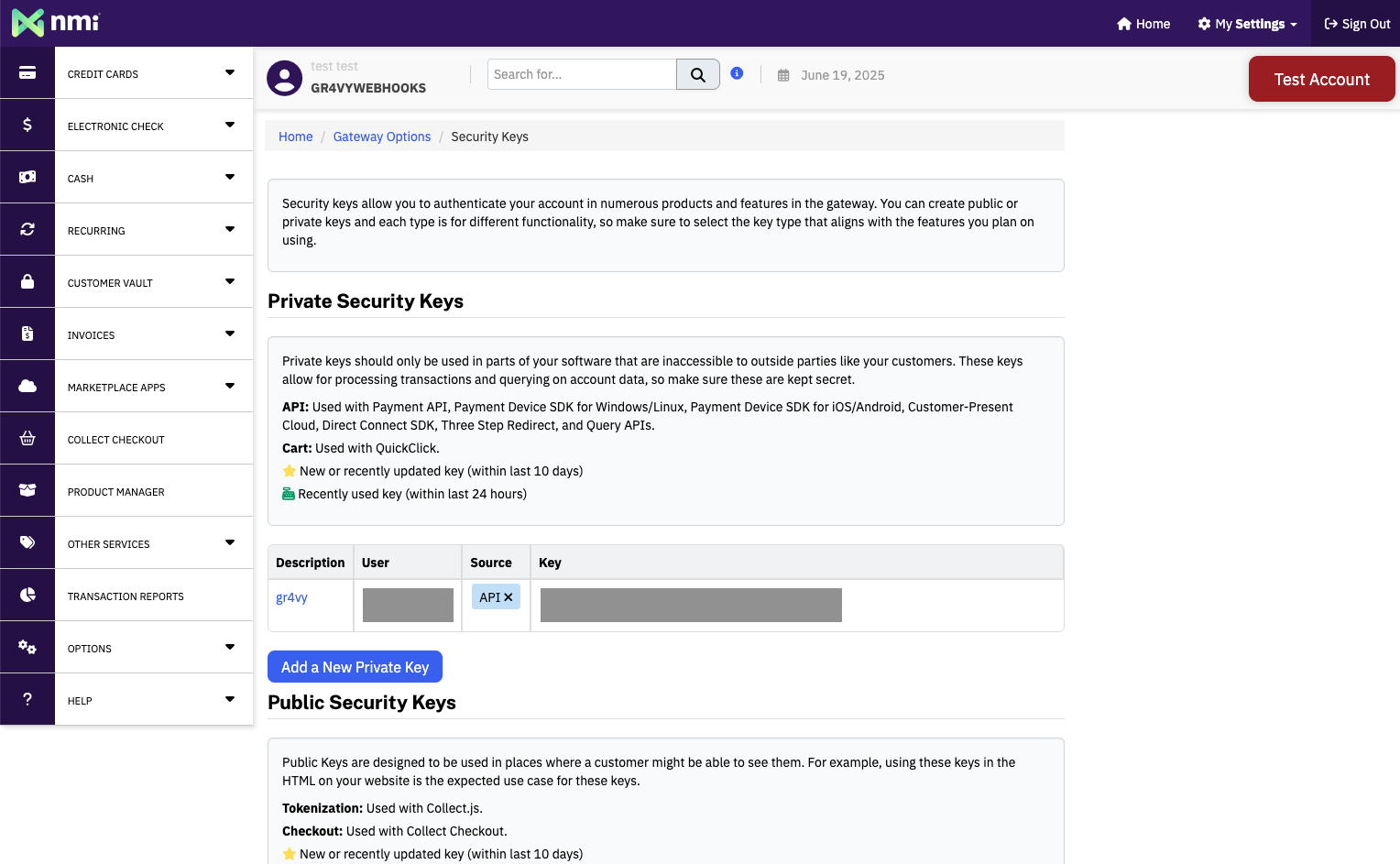
* **API Key** - Your NMI security key, found in the NMI administrator portal
  under **Options** → **Settings** → **Security keys**
* **Use the dedicated NMI Sandbox endpoint (sandbox.nmi.com)** - Turn this on
  if the preceding API Key is a security key from a self-service Sandbox
  account. Leave it off (the default) if the API Key is from a Standard Test
  Merchant Account. Turning this on routes the connection to
  `sandbox.nmi.com` instead of NMI's main gateway. Learn more about [NMI test
  accounts](#test-accounts).

<Frame>
  <img src="https://mintcdn.com/gr4vy/YjfuwBe-3Nu3A-GT/connections/assets/nmi_security_key.png?fit=max&auto=format&n=YjfuwBe-3Nu3A-GT&q=85&s=b7d397c316587dad012801b31b3aad56" alt="NMI Security Key" width="1528" height="943" data-path="connections/assets/nmi_security_key.png" />
</Frame>

<Warning>
  Using the wrong setting for your account type causes NMI to decline every
  transaction. If your security key is from a Standard Test Merchant Account,
  leave this toggle off. If it is from a self-service Sandbox account, turn it
  on.
</Warning>

## Capabilities

<ConnectorCapabilities data={connector} />

Cards are stored with NMI, which keeps and replays the [Mastercard Transaction Link Identifier (TLID)](/guides/features/recurring-payments/mastercard-tlid) itself. Nothing is needed from you or from Gr4vy.

## Supported countries

<ConnectorRegions data={connector} kind="countries" />

## Supported currencies

<ConnectorRegions data={connector} kind="currencies" />

<Note>
  This is a closed-loop connector. Some failover scenarios are limited. For
  details, see [Open-loop versus
  closed-loop](/guides/features/recurring-payments/open-loop).
</Note>

## Recurring payments

NMI stores the card, and later payments on a stored card use NMI's own token.
This has the following effects:

* Repeat payments on a card stored with NMI go through NMI. They can't fail over
  to another connection.
* The scheme transaction ID that NMI returns is NMI's own reference for the
  first payment, not the card network's transaction ID.
* NMI doesn't accept network tokens issued outside NMI.

## Integration

To accept card payments with NMI, use one of Gr4vy's client-side integration
methods to securely collect card details. Due to PCI compliance requirements,
card data should never be sent directly to your servers.

You can integrate using:

* **[Embed](/guides/payments/embed/quick-start)** - A pre-built, customizable
  payment form that handles the complete payment flow
* **[Secure Fields](/guides/payments/secure-fields/quick-start)** - Embed card
  input fields for building custom payment forms while maintaining PCI
  compliance
* **[Mobile SDKs](/guides/payments/mobile)** - Embed SDKs for iOS, Android, and React Native

These methods handle card data collection and tokenization. Once the card
details are collected and tokenized, create a transaction through the Gr4vy API,
which routes the payment to your configured NMI connection based on your Flow
rules or explicit `payment_service_id` parameter.

## Testing

If you test against a self-service Sandbox account (`sandbox.nmi.com`), NMI
applies processor-level restrictions that do not apply to a Standard Test
Merchant Account. These restrictions come from NMI, not from the Gr4vy
connector, but they can look like connector issues if you do not expect them.
See [Test accounts](#test-accounts) for background on the difference between
the two account types.

* **Test cards only** - NMI only accepts a specific set of test card numbers
  on a Sandbox account. Check the documentation in your NMI Sandbox account
  for the current list of supported test cards.
* **Receipt emails** - Transaction receipt emails can only be delivered to the
  email address associated with your NMI Sandbox account. Emails addressed to
  any other recipient are not delivered.
* **No custom descriptors** - Custom statement descriptors are not applied to
  transactions processed through a Sandbox account.

These restrictions do not apply to a Standard Test Merchant Account.

## Test accounts

NMI offers two kinds of test accounts, and they are not interchangeable:

* **Standard Test Merchant Account** - runs on NMI's main gateway at
  `secure.networkmerchants.com`. An NMI Partner provisions this account for
  you, so contact your NMI Partner or sales representative to request one.
* **Sandbox account** - runs on a dedicated sandbox at `sandbox.nmi.com`. NMI
  provides self-service sign-up for this account type. To sign up, visit the
  [sign-up page](https://guide.nmi.com/app/magic-login?mode=signup) and create
  an account.

Each account type has its own security key, and a security key issued for one
endpoint does not work on the other. Keep track of which type of account you
have.

When you configure the connector's credentials in Gr4vy, your account type
determines whether you turn on the **Use the dedicated NMI Sandbox endpoint
(sandbox.nmi.com)** setting. Turn it on for a Sandbox account API key, and
leave it off for a Standard Test Merchant Account API key. Choosing the wrong
setting for your account type causes NMI to decline every transaction, so
this is the detail to get right when you configure credentials.

This setting is unrelated to Gr4vy's production or sandbox environment. Both
NMI account types described here are test accounts, regardless of whether
this toggle is on or off.

The two account types also differ during testing - see [Testing](#testing)
for the restrictions that apply to a Sandbox account.


This documentation is built and hosted on [Mintlify](https://mintlify.com), a developer documentation platform.