> ## Documentation Index
> Fetch the complete documentation index at: https://docs.gr4vy.com/llms.txt
> Use this file to discover all available pages before exploring further.

# Cybersource Decision Manager

> Connect to Cybersource Decision Manager for anti-fraud screening and risk assessment.

export const ConnectorHeader = ({data, name: nameProp, method: methodName, logo, category: categoryProp, catalog, providers}) => {
  const [logoStage, setLogoStage] = useState(0);
  const [chipLogoFailed, setChipLogoFailed] = useState(false);
  const [anchors, setAnchors] = useState({});
  useEffect(() => {
    const found = {};
    for (const id of ["capabilities", "supported-countries", "supported-currencies", "supported-payment-methods"]) {
      found[id] = Boolean(document.getElementById(id));
    }
    setAnchors(found);
  }, []);
  const hasData = Boolean(data && data.id);
  if (!hasData && !(nameProp && logo)) return null;
  const CATEGORY_LABELS = {
    card: "Cards",
    bank: "Banking",
    bnpl: "BNPL",
    cash: "Cash vouchers",
    crypto: "Crypto",
    wallet: "Wallets",
    tokenization: "Tokenization"
  };
  const DISPLAY_NAME_OVERRIDES = {
    authorizenet: "Authorize.net",
    cardpointe: "CardPointe",
    cybersource: "Cybersource",
    dlocal: "dLocal",
    shift4i4go: "Shift4 i4go",
    tokenex: "TokenEx",
    "worldine travelhub": "Worldline TravelHub"
  };
  const HIGHLIGHTS = [{
    keys: ["three_d_secure_pass_through", "three_d_secure_hosted"],
    label: "3-D Secure",
    cardOnly: true
  }, {
    keys: ["network_tokens_default", "network_tokens_toggle"],
    label: "Network tokens",
    cardOnly: true
  }, {
    keys: ["digital_wallets"],
    label: "Digital wallets"
  }, {
    keys: ["delayed_capture"],
    label: "Delayed capture"
  }, {
    keys: ["partial_capture"],
    label: "Partial capture"
  }, {
    keys: ["refunds"],
    label: "Refunds"
  }, {
    keys: ["partial_refunds"],
    label: "Partial refunds"
  }, {
    keys: ["zero_auth"],
    label: "Zero auth"
  }, {
    keys: ["settlement_reporting"],
    label: "Settlement reporting"
  }];
  const d = hasData ? data : {};
  const method = d.method || "";
  const provider = !hasData ? "" : method && d.id.endsWith(`-${method}`) ? d.id.slice(0, -(method.length + 1)) : d.id.split("-")[0];
  const fix = value => DISPLAY_NAME_OVERRIDES[(value || "").toLowerCase()] || value || "";
  const name = fix(d.provider) || nameProp || fix(d.displayName) || provider;
  const displayName = fix(d.displayName);
  const productName = !hasData ? "" : method === "card" ? d.provider ? displayName : "" : methodName || (d.provider && displayName !== name ? displayName : "");
  const methodLed = Boolean(productName);
  const cardProduct = methodLed && method === "card";
  const category = categoryProp || (method === "card" && !cardProduct ? "" : CATEGORY_LABELS[d.category] || "");
  const flowLabel = d.category !== "bank" ? "" : d.mode === "bank" ? "Stored in Gr4vy" : d.mode === "redirect" ? "Redirect" : "";
  const providerLogo = hasData ? `/assets/connectors/providers/${provider}.svg` : logo;
  const methodLogo = `/assets/connectors/methods/${method}.svg`;
  const title = methodLed ? productName : name;
  const chipLabel = !hasData ? "" : methodLed ? `via ${name}` : methodName;
  const chipLogo = cardProduct ? "" : methodLed ? providerLogo : methodLogo;
  const logos = methodLed && !cardProduct ? [methodLogo, providerLogo] : [providerLogo];
  const primaryLogo = logos[logoStage] || null;
  const enabled = new Set((d.features || "").split(/\s+/).filter(Boolean));
  const highlights = HIGHLIGHTS.filter(h => !(h.cardOnly && method !== "card") && h.keys.some(k => enabled.has(k)));
  const codes = value => (value || "").split(/\s+/).filter(Boolean);
  const providerSet = new Set(codes(providers));
  const members = !hasData && catalog && providerSet.size > 0 ? catalog.filter(e => providerSet.has(e.provider)) : [];
  const union = key => new Set(members.flatMap(e => codes(e[key]))).size;
  const methodsCount = members.length;
  const countries = hasData ? codes(d.supportedCountries).length : union("countries");
  const currencies = hasData ? codes(d.supportedCurrencies).length : union("currencies");
  const border = "1px solid rgba(128, 128, 128, 0.2)";
  const labelStyle = {
    fontSize: "0.6875rem",
    fontWeight: 600,
    letterSpacing: "0.05em",
    textTransform: "uppercase",
    opacity: 0.6
  };
  const chipStyle = {
    display: "inline-flex",
    alignItems: "center",
    gap: "0.3rem",
    padding: "0.1rem 0.5rem",
    borderRadius: "999px",
    border,
    fontSize: "0.8125rem",
    whiteSpace: "nowrap"
  };
  const renderStat = (label, value, anchor) => <a href={anchors[anchor] ? `#${anchor}` : undefined} style={{
    display: "flex",
    flexDirection: "column",
    gap: "0.1rem",
    textDecoration: "none",
    borderBottom: "none",
    color: "inherit",
    minWidth: "6rem"
  }}>
      <span style={labelStyle}>{label}</span>
      <span style={{
    fontSize: "1.25rem",
    fontWeight: 600
  }}>{value}</span>
    </a>;
  return <div className="not-prose" style={{
    border,
    borderRadius: "0.75rem",
    padding: "1.25rem",
    margin: "1rem 0 1.5rem",
    display: "flex",
    flexDirection: "column",
    gap: "1rem"
  }}>
      <div style={{
    display: "flex",
    alignItems: "center",
    gap: "1rem"
  }}>
        {primaryLogo ? <img src={primaryLogo} alt={`${title} logo`} width="56" height="56" onError={() => setLogoStage(logoStage + 1)} style={{
    width: "3.5rem",
    height: "3.5rem",
    borderRadius: "0.5rem",
    margin: 0,
    flexShrink: 0
  }} /> : <span aria-hidden="true" style={{
    width: "3.5rem",
    height: "3.5rem",
    borderRadius: "0.5rem",
    border,
    display: "flex",
    alignItems: "center",
    justifyContent: "center",
    fontSize: "1.5rem",
    fontWeight: 600,
    flexShrink: 0
  }}>
            {title.charAt(0).toUpperCase()}
          </span>}
        <div style={{
    display: "flex",
    flexDirection: "column",
    gap: "0.35rem",
    minWidth: 0
  }}>
          <span style={{
    fontSize: "1.25rem",
    fontWeight: 600,
    lineHeight: 1.2
  }}>{title}</span>
          <span style={{
    display: "flex",
    flexWrap: "wrap",
    gap: "0.4rem",
    alignItems: "center"
  }}>
            {chipLabel ? <span style={chipStyle}>
                {chipLogoFailed || !chipLogo ? null : <img src={chipLogo} alt="" width="16" height="16" onError={() => setChipLogoFailed(true)} style={{
    width: "1rem",
    height: "1rem",
    borderRadius: "0.2rem",
    margin: 0
  }} />}
                {chipLabel}
              </span> : null}
            {category ? <span style={{
    ...chipStyle,
    opacity: 0.75
  }}>{category}</span> : null}
            {flowLabel ? <span style={{
    ...chipStyle,
    opacity: 0.75
  }}>{flowLabel}</span> : null}
          </span>
        </div>
      </div>

      {methodsCount > 0 || countries > 0 || currencies > 0 || highlights.length > 0 ? <div style={{
    display: "flex",
    flexWrap: "wrap",
    gap: "1rem 2rem",
    paddingTop: "1rem",
    borderTop: border
  }}>
        {methodsCount > 0 ? renderStat("Payment methods", methodsCount, "supported-payment-methods") : null}
        {}
        {countries > 0 ? renderStat("Countries", countries >= 200 ? "No limit" : countries, "supported-countries") : null}
        {currencies > 0 ? renderStat("Currencies", currencies >= 150 ? "No limit" : currencies, "supported-currencies") : null}
        {highlights.length > 0 ? <div style={{
    display: "flex",
    flexDirection: "column",
    gap: "0.35rem",
    flex: "1 1 16rem"
  }}>
            <span style={labelStyle}>Highlights</span>
            <span style={{
    display: "flex",
    flexWrap: "wrap",
    gap: "0.35rem"
  }}>
              {highlights.map(h => <span key={h.label} style={chipStyle}>
                  <span aria-hidden="true" style={{
    color: "#16a34a",
    fontWeight: 700
  }}>✓</span>
                  {h.label}
                </span>)}
              {anchors.capabilities ? <a href="#capabilities" style={{
    ...chipStyle,
    borderStyle: "dashed",
    textDecoration: "none",
    color: "inherit"
  }}>
                  All capabilities →
                </a> : null}
            </span>
          </div> : null}
      </div> : null}
    </div>;
};

<ConnectorHeader name="Cybersource Decision Manager" logo="/assets/connectors/anti-fraud/cybersource.svg" category="Anti-fraud" />

Decision Manager (DM) is the anti-fraud service provided by Cybersource.
Although Cybersource DM can be run as part of the payment gateway as well,
it can only be used as a standalone service in the system.

## Prerequisites

When you choose to use Cybersource as a payment gateway alongside Cybersource
Decision Manager, you must configure the **Extended Settings** in the **Cybersource
Enterprise Business Centre (EBC)**. This makes sure the payment processing
and anti-fraud checks run independently and allows the system to manage the status
of the transaction correctly.

In EBC head over to **Decision Manager** -> **Configuration** -> **Extended Settings**,
and then ensure the following values are unchecked.

* Authorization-Card-Present
* Authorization-Card Not Present

## Credentials

To configure a Decision Manager connection, you need to set the
following credentials. Each of these can be found in the EBC.

| Credential | Description |
| :- | :- |
| Merchant ID | The Merchant ID is provided by Cybersource during setup. |
| SOAP Toolkit Key | This key needs to be generated in the Cybersource Enterprise Business Centre portal. |
| ThreatMetrix Org ID | This is the organization ID for use with ThreatMetrix device fingerprints. You need to contact your Cybersource support representative for this value. A different value is expected for sandbox and production. |

## Device fingerprinting

The use of device fingerprinting is highly recommended when using Cybersource DM.
The device fingerprint passed to Cybersource is generated automatically by the
[device fingerprinting library](/guides/features/anti-fraud/fingerprint).

If you want to pass your own `antiFraudFingerprint` to Embed or to the API,
load the fingerprint script for Cybersource directly and pass the `session_id`
value as the `anti_fraud_fingerprint` to the
[new transaction API](/reference/transactions/new-transaction).

```html theme={"system"}
<script
  type="text/javascript"
  src="https://cdn-f.gr4vy.com/fp/tags.js?org_id=<org_id>&session_id=<merchant_id><session_id>"
></script>
```

## Webhooks for manual review

To enable manual review you need to set up webhooks from your anti-fraud service to the system. This
webhook is used to notify the system when a review is accepted or rejected.

To get the webhook URL, head over to your connection by going to **Connections** ->
**\[Anti-Fraud connection]** -> **Synchronization** and copy the webhook URL.

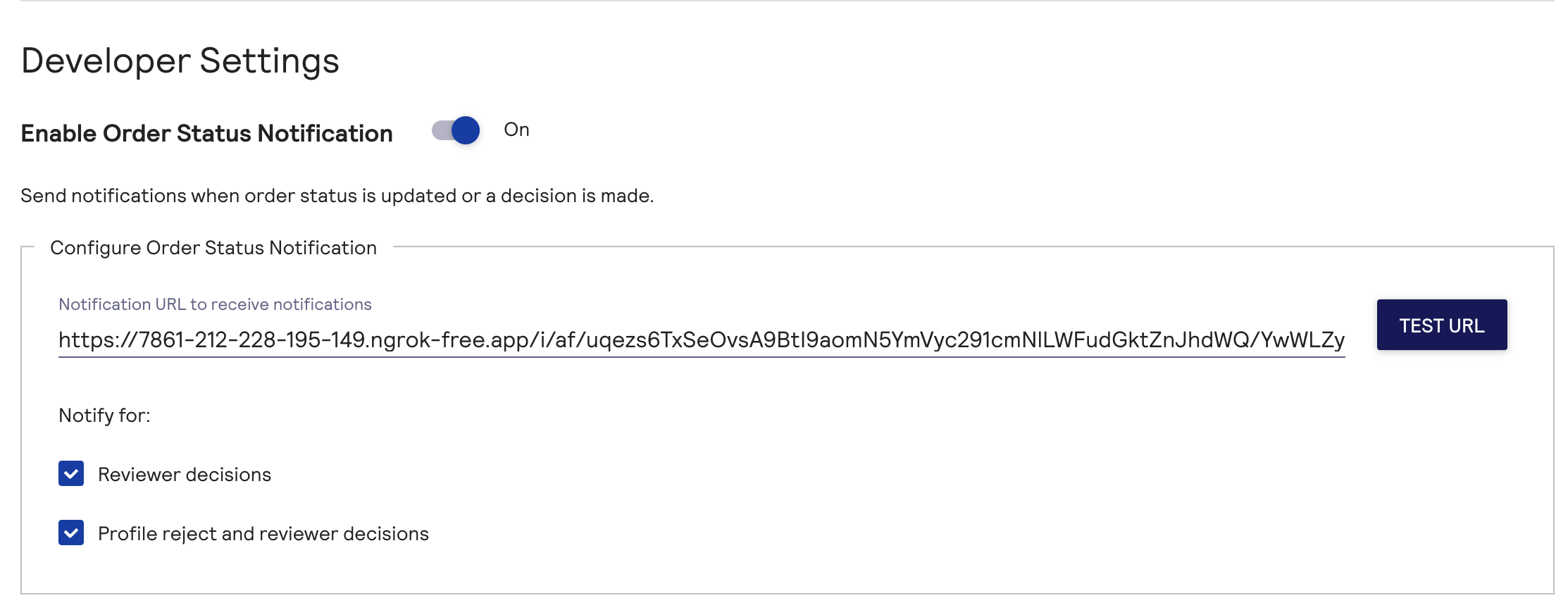
Next, login to EBC and navigate to **Decision Manager** -> **Configuration** -> **Extended Settings** and
paste the webhook URL into the **Configure Order Status Notification** input.

<Frame caption="Configuration of the webhook URL">
  <img
    src="https://mintcdn.com/gr4vy/jCFeFdffXM43huI0/assets/images/anti-fraud/webhook-settings.png?fit=max&auto=format&n=jCFeFdffXM43huI0&q=85&s=68fd80eae1b2d5b12cecf404e73f280b"
    alt="Configuration of the webhook
URL"
    width="2226"
    height="866"
    data-path="assets/images/anti-fraud/webhook-settings.png"
  />
</Frame>

## Decision mapping

Decisions received from Cybersource are mapped to the decisions according to the following logic.

| Cybersource decision | Decision |
| :- | :- |
| `accept` | `accept` |
| `reject` | `reject` |
| `review` | `review` |
| `error` | `error` |
| all other | `error` |

If any of the data requirements below are not met, the decision is `skipped`. If there was a
technical issue reaching Forter the decision returns as an `exception`.

## Buyer requirements

When using Decision Manager, an anti-fraud decision is only possible
if the transaction has a minimum set of required fields set on a buyer.

To call DM, the transaction must be associated with a buyer and the
buyer must have the following fields populated.

* First name
* Last name
* Email address
* Line 1
* City
* Country
* Postal code

If any of these values are not provided then the call to Cybersource Decision
Manager can not be completed and the anti-fraud decision results in a **Skipped** decision.

### Additional data

When any of the following attributes are associated with a transaction they are
sent to Cybersource Decision Manager as well.

* The buyer's shipping address
* Any cart items

You can also pass custom merchant-defined data and a device fingerprint ID
specifically for Cybersource Decision Manager using [connection options](/reference/transactions/new-transaction#body).

## Sandbox testing

Using the EBC portal you can create custom
rules for Decision Manager. For example, you may choose to create a rule which
marks a transaction for manual review given the postal code matches a specific
value.

To test this rule you need to perform the following steps in the dashboard.

1. Create a [Cybersource Decision Manager connection](/guides/features/anti-fraud/setup)
2. Create a buyer with a matching postal code
3. Create a Flow rule to leverage the Cybersource Decision Manager connection
4. Create a transaction using the newly created buyer


This documentation is built and hosted on [Mintlify](https://mintlify.com), a developer documentation platform.